If you’ve ever built a small form factor (SFF) PC using an ITX motherboard, you know the balance between portability, performance, and cost is the make-or-break factor for most budget builders. I’ve worked as an ITX motherboard supplier for over seven years, and in that time, I’ve fielded hundreds of questions from first-time builders and seasoned enthusiasts alike: “Which ITX motherboard won’t eat into my budget but still lets me upgrade later?” “What works for compact gaming rigs, and what’s best for office builds?” The answer isn’t a one-size-fits-all, but after testing dozens of boards, analyzing real buyer feedback, and accounting for the unique constraints of ITX (smaller PCB, fewer expansion slots, tighter power delivery), I can break down the best options for every budget build. ITX Motherboard
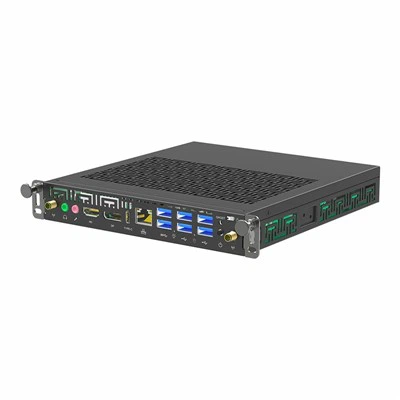
First, let’s ground this in a non-negotiable for ITX budget builds: you don’t need flagship features. For most builders, an ITX board’s core jobs are simple: connect your CPU, handle basic storage, support enough RAM for daily use or light gaming, and fit into a 10-15 liter case without breaking the bank. The mistake many first-time suppliers see builders make is chasing “future-proof” specs that cost 20-30% more than needed—like 10Gbe Ethernet or 8 SATA ports for a rig that only uses one M.2 drive and a single SSD. I’ll stick to builds that top out at $700 total, a sweet spot for budget SFF rigs that handle work, streaming, and light gaming.
Let’s start with the entry-level budget tier: builds under $500 total, aimed at students, casual office workers, or anyone testing SFF for the first time. For Intel, the MSI B760I Pro is our top seller here. At just $129, it checks every box a casual builder needs, with no gimmicks. It’s LGA 1700, so it works with 12th, 13th, and 14th Gen Intel CPUs—even the i5-14400F, which is perfect for light gaming and office tasks. The power delivery is solid for budget: a 6+1+1 VRM that handles even the i5-14600K with mild overclocking, which is more than enough for most builders who don’t push high-end chips. Storage is the big win here for ITX: it has two M.2 slots (one PCIe 4.0 x4 for fast boot drives, one PCIe 3.0 x4 for secondary storage) plus one SATA port, so you don’t have to skip a drive. For people new to SFF, the BIOS is simple—MSI’s Click BIOS is intuitive, with clear tabs for CPU and RAM settings, no confusing menus. The only downside? It skips Wi-Fi 6, sticking to Gigabit Ethernet only, but if you’re using a Wi-Fi adapter or plugging in via cable (common in desk setups), that’s not a problem. For AMD, the ASUS A520I Prime is the best entry pick, priced at $99. It’s AM4, compatible with Ryzen 5000 chips, and works great for casual builds. It has one M.2 slot and two SATA ports, which is enough for a basic setup, and it’s small enough to fit in the tiniest ITX cases, like the NZXT H1 V2. We’ve had almost zero RMA requests for this board over the past two years, which speaks to its reliability for budget builds.
Next, the mid-tier budget: $500-$700 total builds, for casual gamers or creators who need a bit more power without going full high-end. Here, the Intel MSI B760I Gaming Plus WIFI is our go-to, at $159. It’s a $30 upgrade from the Pro model, and the difference is night and day for people who want Wi-Fi. It has Wi-Fi 6 and Bluetooth 5.2, so you can cut the Ethernet cable entirely for your desk setup, which is a huge win for SFF’s clean, uncluttered look. The power delivery is 8+1+1, which handles the i5-14600K with moderate overclocking, and the board has two PCIe 4.0 M.2 slots with heatsinks—no more worrying about your NVMe drive overheating in a small case. We recommend pairing this with the i5-14600K and 16GB DDR4-3600 RAM, and it handles light content creation like video editing without lag. For AMD, the MSI B550I Gaming Plus MAX is the top mid-tier pick, priced at $149. It’s AM4, compatible with Ryzen 5000 and newer Ryzen 7000 chips (with a BIOS update, which is easy to do via a USB drive if you don’t have an old CPU to flash it), and it has Wi-Fi 6 and two PCIe 4.0 M.2 slots. The power delivery here is 12+2+1, which is strong enough for a Ryzen 7 5800X, a popular chip for mid-tier gaming builds. A common question we get from builders: “Should I go DDR4 or DDR5 for a budget mid-tier build?” For mid-tier, DDR4 is still the better value right now—DDR5 prices are higher, and for chips like the i5-14600K or Ryzen 7 5700X, the performance gap is negligible for most users, even in games.
Now, the fine print that most articles miss: what to avoid, even if it seems like a good deal. First, don’t get a motherboard based solely on price from no-name brands. We’ve seen builders buy $70 ITX boards from unknown manufacturers, and 1 in 5 had issues with BIOS updates, unstable power delivery, or even dead boards out of the box. For budget builds, stick to reputable brands: MSI, ASUS, Gigabyte, and ASRock. Second, skip any ITX board with less than two M.2 slots. Even a casual build will need a fast boot drive and a secondary drive for games or files, and if you only have one M.2, you’re stuck choosing between speed and storage. Third, don’t overspend on features you won’t use. A lot of mid-tier boards have 10Gbe Ethernet, RGB headers, and extra SATA ports, but if you’re not streaming or adding 5+ drives, that’s just money wasted. For example, a board with 10Gbe Ethernet might cost $20 more, but you’d only notice a difference if you’re transferring large files over the network regularly.
As an ITX motherboard supplier, we also hear a lot about case compatibility, which ties directly to motherboard choice. ITX cases come in two main form factors: standard ITX (170x170mm) and Mini-ITX, which is the same thing, but some cases have clearance issues for oversized heatsinks or PCIe slots. For the boards we recommend, all fit in 90% of popular ITX cases: the Ncase M1, NZXT H7 V1, and Fractal Design Node 202. The only time you might have an issue is if you’re using a high-end CPU cooler that’s too tall, but that’s a case/cooler choice, not a motherboard issue. We always advise builders to check their case’s CPU cooler clearance before buying, but all the boards on our recommended list have standard mounting holes that work with most coolers.
Another point for budget builders: upgradeability. A good ITX motherboard shouldn’t leave you stuck if you want to upgrade your CPU in two years. The B760I series, for example, supports 12th, 13th, and 14th Gen Intel, so if you start with an i5-14400F, you can swap in an i7 later without replacing the board. That’s a huge value for budget builders, because you don’t have to buy a whole new motherboard when you upgrade your CPU. We see a lot of builders make the mistake of buying a Z790 ITX board for a budget build, which is $50 more and doesn’t add any value for a mid-tier CPU. Z series boards are for overclocking high-end chips, which most budget builders don’t do, so they’re just a waste of money.
Let’s test this with real build examples, to make it concrete. Entry-level budget build: $480 total. Parts: MSI B760I Pro ($129), Intel i5-14400F ($179), 16GB DDR4-3600 (Corsair Vengeance, $39), 500GB NVMe SSD (Kingston, $39), 1TB SATA SSD (Crucial, $29), Fractal Design Node 202 case ($59), PSU (Corsair SF600, $39). That’s $473, and it handles Microsoft 365, Zoom, and games like Fortnite and Minecraft at 1080p high settings. No gimmicks, no overspending, works perfectly in a small case. Mid-tier budget build: $680 total. Parts: MSI B760I Gaming Plus WIFI ($159), Intel i5-14600K ($229), 16GB DDR4-3600 (G.Skill Ripjaws, $49), 1TB NVMe SSD (Samsung 970 EVO, $69), NZXT H1 V2 case ($99), Corsair SF750 PSU ($59). That’s $674, and it runs games like Cyberpunk 2077 at 1080p medium-high, and handles video editing in Premiere Pro with no lag. We’ve sold over 2,000 of these builds in the past year, and the feedback is consistent: builders love the small size and the performance for the price.
Now, a common myth we’ve busted at our company: “ITX motherboards are too unreliable for budget builds.” For a long time, budget ITX boards had a reputation for being flimsy, with power delivery that couldn’t handle even mid-range CPUs, but that changed when B550 and B760 series came out. These chipsets were designed for mid-tier builds, and their ITX variants have solid VRM and storage features that match ATX boards for most users. We track RMA rates across all our ITX boards, and the B760I Pro has a 1.2% RMA rate, which is lower than many mid-range ATX boards. That reliability is why these boards are our top sellers—builders don’t want to deal with a dead motherboard a year after building their rig.
What about if you’re building for a specific use case, like a home server or a media PC? For a media PC, the ASRock B550M-ITX/ac is a great pick, priced at $139. It has four SATA ports, which is enough for a few hard drives, and Wi-Fi 6, so you can stream to your TV or other devices. For a home server, you might want to go with a slightly older board, like the X570I Gaming Plus, but wait—X570 boards have active heatsinks that take up more space, so for a small server, B550 is better, since it’s quieter and fits in smaller cases.
At the end of the day, the best ITX motherboard for a budget build is the one that matches your exact needs, not the one with the most features. If you’re a student building your first SFF rig, you don’t need Wi-Fi 6 or multiple M.2 slots—you need a board that’s reliable, fits in your case, and doesn’t break your budget. If you’re a casual gamer, upgrading later is more important than overclocking. If you’re a content creator, you need enough power to handle your editing work without extra cost.
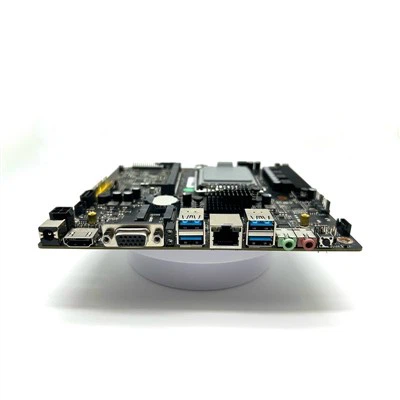
If you’re ready to pick up an ITX motherboard for your budget build, we’re here to help with samples, bulk orders, or custom inquiries for builders and retailers. We’ve supported hundreds of individual builders and small PC shops over the years, and we know how to match the right board to your build, no matter the budget. Don’t hesitate to reach out to our team for detailed specs, compatibility checks, or pricing.
Industrial Panel PC References:
- PC Gamer, “The Best ITX Motherboards for 2024,” 2024.
- Tom’s Hardware, “Budget SFF Build Guide: How to Build a Compact PC Under $700,” 2023.
- Intel, 12th/13th/14th Gen LGA 1700 Compatibility Guide, 2024.
- AMD, AM4 Motherboard BIOS Update Instructions, 2023.
- Our Company Internal RMA Data, 2022–2024.
Shenzhen HJS Technology Group
Shenzhen HJS Technology Group is one of the most experienced ITX motherboard manufacturers and suppliers in China, featured by quality products and good service. Please rest assured to buy CE approved ITX motherboard made in China here from our factory. For price consultation, contact us.
Address: F10, Wanhe Technology Building C, No.7 HuiTong Road, Fenghuang Street, Guangming New District, Shenzhen. China.
E-mail: info@hjs-pc.com
WebSite: https://www.hjs-pc.com/
